Affiliate disclosure: TimewasterAI may earn a commission when you purchase through links on this page, at no additional cost to you.
Recording an idea is easy. Turning that recording into something useful is often the annoying part.
You can dictate a thought into your phone, record a meeting, or leave yourself a rambling voice note. But raw transcription can still leave you staring at a wall of text that needs editing, organizing, shortening, or rewriting before you can actually use it.
SpeakON is trying to solve that second problem.
Review basis: TimewasterAI has not confirmed firsthand testing of SpeakON. This review is based on current official SpeakON product information, policies, supplied affiliate-program information, and public research. Product performance in everyday use may differ from manufacturer claims.
Quick Answer
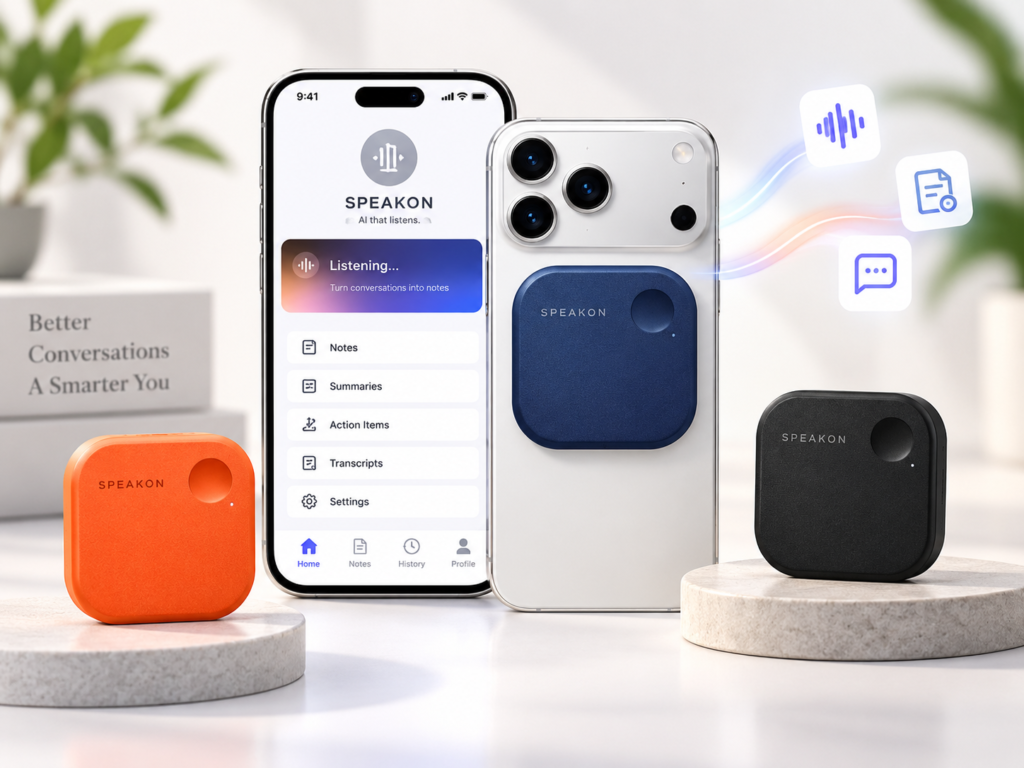
SpeakON is an iPhone-focused voice productivity system that combines a magnetic hardware button and microphone with SpeakON’s AI software. Instead of stopping at raw transcription, the software can clean up spoken text, remove filler and corrections, format ideas, adjust writing style, translate text, and let you edit generated text with your voice.
The concept makes the most sense for people who already think out loud and frequently turn spoken ideas into messages, notes, drafts, lists, or other written communication.
The biggest reason not to immediately buy the hardware is simple: SpeakON also offers a free software-only plan. If ordinary dictation or the free SpeakON app already handles what you need, another device may be unnecessary.
There is also a privacy consideration. SpeakON says customer content is not used to train its AI models or third-party AI models, but its terms state that AI inputs may be processed by third-party large language models. Users handling confidential or sensitive material should understand those data flows before relying on it.
What Is SpeakON?
SpeakON is easier to understand if you separate it into two pieces: the physical accessory and the software behind it.
1. The SpeakON Hardware
The physical SpeakON device is a compact voice-capture accessory designed to magnetically attach to compatible iPhones. According to SpeakON, it has its own microphone and physical voice button.
The idea is to remove some of the friction between having a thought and capturing it. Instead of unlocking your phone, finding an app, and starting a recording or dictation session, SpeakON is designed around pressing its physical button and speaking.
SpeakON says the hardware can capture a recording while the phone is locked or while you’re offline. The recording can then sync later when a connection is available.
SpeakON currently says its software works on iPhones running iOS 16.0 or later. For the full magnetic hardware experience, the company specifies an iPhone 12 or newer with MagSafe compatibility.
2. The AI Software
The software is where SpeakON moves beyond being another miniature voice recorder.
SpeakON describes its communication layer as Attune. Its broader software feature set is designed to take spoken input and turn it into cleaner text rather than simply producing a word-for-word transcript.
Current official features include Smart Polish for removing fillers and corrections, automatic formatting, Style controls, voice editing, translation, a custom dictionary, and Notes for saving and revisiting captured ideas.
SpeakON says it works with most iPhone apps that accept text input, including Messages, Notes, Mail, search, documents, and productivity apps.
The Real Problem SpeakON Is Trying to Solve
The interesting part of SpeakON isn’t simply that you can talk instead of type. Your iPhone can already handle basic dictation and recording.
The more interesting question is what happens after you talk.
Imagine you have a content idea while walking. You speak for a minute and end up with false starts, repeated points, filler words, and three ideas mixed together.
A conventional transcription tool may faithfully turn that into messy text.
SpeakON’s pitch is that its AI layer can help turn that spoken thought into cleaner, more appropriately formatted written communication.
That distinction matters. If all you need is a transcript, you have simpler options. If your recurring problem is turning speech into something you can actually send, save, or develop further, SpeakON becomes more interesting.
Explore SpeakON
Good starting point: Review the current SpeakON offer and decide whether its voice-to-text workflow fits how you capture ideas.
See Current SpeakON DetailsSpeakON Offer
Before choosing: Check the current product details, compatibility, included features, and pricing shown on the destination page.
View SpeakONSpeakON Option
Worth checking: Compare what is currently included with the free software option and the hardware-based workflow discussed in this review.
Check Current DetailsSpeakON Product Details
Check first: Confirm that the current offer matches your iPhone, intended workflow, and feature requirements before purchasing.
See SpeakON DetailsSpeakON Compatibility & Features
Before purchasing: Review the current compatibility and included software features rather than assuming every iPhone or plan works the same way.
Check SpeakONMore From SpeakON
Buying consideration: Check the destination for the current SpeakON product or offer details before deciding whether you need the hardware or a simpler voice-note solution.
Explore SpeakON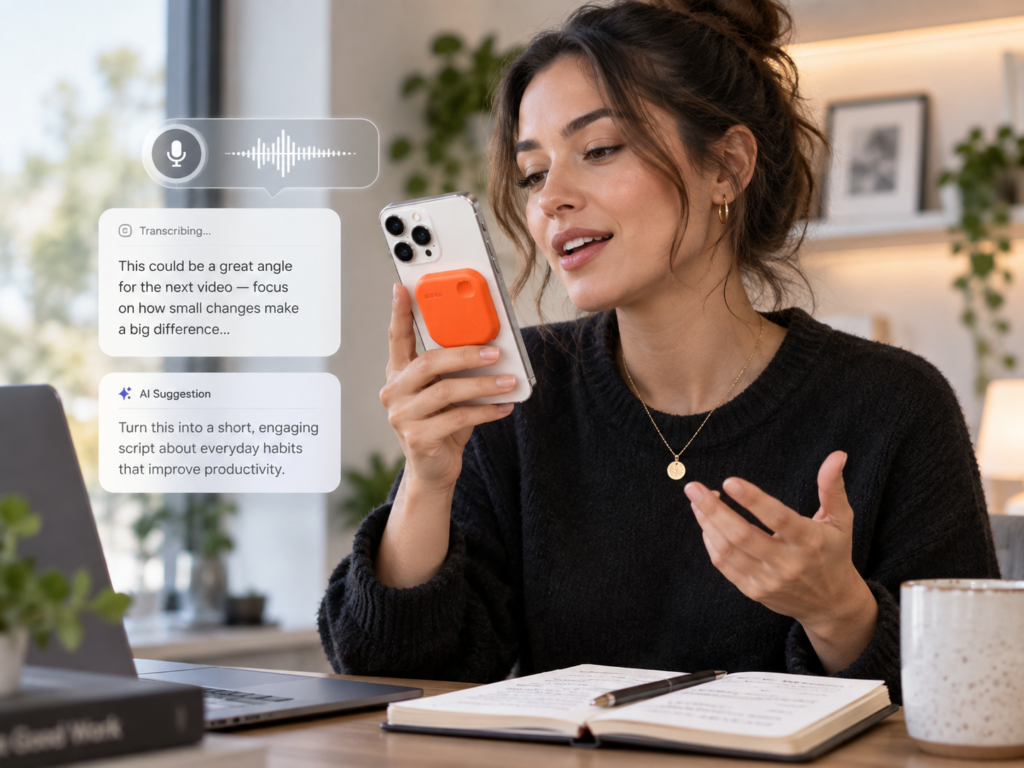
How the SpeakON Hardware Works
SpeakON’s hardware is essentially a dedicated shortcut between a spoken thought and the SpeakON software.
The company says the device uses a dedicated microphone and a physical voice button. For the magnetic hardware setup, SpeakON specifies an iPhone 12 or newer. The broader app requires iOS 16.0 or later.
One potentially useful feature is offline capture. SpeakON says the device can record locally when you’re offline and synchronize later. That is different from claiming the complete AI workflow happens offline: SpeakON’s terms explain that AI features can use third-party large language models for processing.
SpeakON currently advertises more than 10 hours of continuous use and up to two weeks of standby time for the hardware. Those are manufacturer specifications rather than TimewasterAI test results.
The physical button is most compelling if opening an app is itself part of your problem. If you are already happy opening Voice Memos, Notes, or another transcription app, the hardware has more to prove.
What Does Attune Do?
Attune is the part of SpeakON’s system focused on how your spoken thought should come across rather than merely which words you said.
SpeakON’s current creator documentation describes Style modes including Off, Casual, Professional, and Formal. The company says SpeakON can adjust output according to the communication context.
That could matter when the same rough thought needs to become very different kinds of writing. A quick message to a friend should not necessarily sound like an email to a client.
Other current SpeakON features complement that idea:
- Smart Polish: designed to remove filler words, repetition, and mid-sentence corrections.
- Auto-format: can organize spoken information, including turning scattered points into structured lists.
- Voice Edits: lets you reshape generated text using voice commands.
- Translation: SpeakON currently lists 12 supported languages and can send translated text into an active app.
- Dictionary: designed to retain names, jargon, slang, and other terms that ordinary transcription may misunderstand.
- Notes: lets you capture, title, edit, organize, and revisit spoken ideas.
This is the central reason to look at SpeakON as a communication tool rather than simply a recorder.
SpeakON vs. Basic Voice Transcription
Basic Recording
You speak and save an audio recording. You may still need to listen to it later, transcribe it, and turn it into something usable.
Basic Transcription
You speak and receive text. This removes the manual transcription step, but the resulting text may still contain repetition, false starts, poor structure, and conversational clutter.
SpeakON’s Approach
SpeakON attempts to capture the speech and then use AI features to polish, structure, edit, translate, or adapt the resulting text for its intended use.
That doesn’t automatically make SpeakON better for everyone. It makes it a different solution to a different problem.
If your problem ends when your speech becomes text, you may not need SpeakON hardware. If your problem starts after transcription because you still have to clean everything up, its AI workflow is more relevant.
Realistic Ways You Might Use SpeakON
The following are practical examples based on SpeakON’s documented features. They are not examples from TimewasterAI firsthand testing.
Capture a Content Idea
A creator gets an article or video idea away from the computer. Instead of typing the entire thought on a phone, they speak the rough idea, save it as a Note, and use SpeakON’s formatting or editing tools to make the text easier to work with later.
Turn a Rambling Thought Into a Message
You know what you want to say but don’t want to thumb-type a long message. Speak naturally, then use SpeakON’s cleanup and Style features to produce something closer to the communication you intended.
Create a Quick List
You speak several errands, tasks, product ideas, or follow-up items in one stream. Auto-formatting can potentially turn that spoken information into a more structured list.
Capture an Idea Offline
SpeakON says its hardware can capture recordings locally while offline and synchronize later. That could be useful during a commute or anywhere connectivity is unreliable.
Translate a Spoken Message
SpeakON currently supports translation into 12 languages. The translated text can be delivered into the active app, reducing the need to move text manually between separate translation and messaging apps.
Safety note: A one-button capture system may reduce interaction with the phone, but that does not make phone use safe in every situation. When driving, follow local laws and avoid interacting with devices when doing so would distract you from driving.
SpeakON Pricing: What Does It Cost?
As of this review, SpeakON’s official pricing page lists a free software plan at $0 and the SpeakON hardware with Pro Lifetime at $129 as a one-time purchase.
The free plan is software-only and currently includes up to 2,000 words of voice typing per week. SpeakON lists features including Notes, Voice Edits, Style, auto-formatting, Translation, and Dictionary.
The $129 hardware purchase currently includes the SpeakON device and permanent Pro access with unlimited voice typing and the current Pro features. SpeakON describes this as Pro Lifetime and says there is no recurring subscription for that hardware bundle.
SpeakON has also published information about software-only Pro subscription options. Because plan availability and pricing can change, check the current pricing page before choosing between software-only access and the hardware bundle.
Try the Free Option First
If you’re unsure whether AI-assisted voice writing fits your workflow, the free software plan is the logical place to start. You can find out whether you actually use SpeakON’s cleanup, formatting, Style, Notes, and voice-editing features before deciding whether a dedicated physical button is worth $129 to you.
What About Privacy?
SpeakON says voice data is encrypted, is not sold, and is not used to train its AI models. Its terms also say customer content is not used to train third-party AI models.
However, that does not mean all processing is local.
SpeakON’s current Terms of Service say its AI features use third-party large language models and that input may be processed by those providers to generate output.
Cloud Sync can also store transcripts, generated text, dictation history, and SpeakON Notes so they remain available across devices. SpeakON says its stored or processed personal information is currently hosted in U.S.-based infrastructure.
Original voice recordings are described as being retained only for the short period needed to provide the service output before deletion, unless the user explicitly consents to retention for feedback analysis or retention is otherwise legally required or permitted.
Most importantly, SpeakON’s own terms warn that its services are not designed for legally privileged, confidential, or highly sensitive information. That is worth considering before recording sensitive business, legal, health, or financial material.
Who Is SpeakON For?
SpeakON makes the most sense for iPhone users who already know that voice is an important part of how they think or work.
That may include creators capturing content ideas, writers thinking through rough drafts, entrepreneurs sending frequent updates, professionals creating follow-up messages, and anyone who regularly leaves themselves voice notes that later need to become usable text.
The physical hardware is particularly relevant when the friction of unlocking the phone, opening an app, and starting a recording causes you to lose ideas or avoid voice capture altogether.
Who Should Skip SpeakON?
You probably don’t need the SpeakON hardware if:
- You rarely record or dictate thoughts.
- You only need straightforward voice-to-text transcription.
- Apple’s built-in tools already solve your problem.
- You don’t see value in having a dedicated physical capture button.
- Your phone does not meet SpeakON’s compatibility requirements.
- You are uncomfortable with the cloud and third-party AI processing required for relevant features.
- You routinely work with highly sensitive or legally privileged material that should not enter this type of AI workflow.
The existence of a more sophisticated tool doesn’t automatically make your current workflow inadequate.
SpeakON Pros
- It targets the problem after transcription. Cleanup, formatting, Style, Notes, translation, and voice editing can make spoken input more usable.
- The hardware reduces capture friction. A dedicated physical button may be valuable for people who constantly capture ideas.
- Offline capture is supported. The hardware can record locally and synchronize later.
- The free software tier provides a lower-risk starting point. You don’t necessarily have to buy the hardware to see whether the workflow fits you.
- Pro Lifetime is bundled with the hardware. The current $129 device purchase includes permanent Pro access rather than requiring a recurring subscription for that bundle.
SpeakON Limitations
- It is centered on the iPhone ecosystem. The magnetic hardware experience requires a compatible iPhone.
- $129 is difficult to justify if ordinary dictation already works for you. The additional value comes from convenience and the AI workflow, not merely recording your voice.
- AI output still needs human review. SpeakON’s own terms warn that AI-generated output can contain errors, omissions, biases, or misinterpretations.
- AI processing has privacy implications. Relevant input may be processed through third-party LLMs, and Cloud Sync can store supported content on SpeakON infrastructure.
- The hardware creates another device to carry and charge. That tradeoff only makes sense if the physical button meaningfully improves your workflow.
What Are the Simpler Alternatives?
Your iPhone’s Built-In Tools
If you mainly need to record a thought or dictate short text, start with the tools already on your iPhone. They may be enough, and they cost you nothing extra.
A Transcription App
If your only frustration is converting longer recordings into text, a dedicated transcription app may solve the problem without requiring additional hardware.
An AI Note-Taking App
If meetings and organized notes are the real problem, compare SpeakON with software designed specifically around meeting transcription, summaries, and searchable notes.
A Dedicated Recorder
If preserving high-quality audio files is more important than producing polished written communication, a traditional recorder may be a better fit. SpeakON’s strongest proposition is the transition from spoken thought to usable text.
Should You Buy SpeakON?
Use a Simpler Solution If…
You mainly want to record occasional thoughts or convert speech into basic text. Start with the iPhone tools you already have or SpeakON’s free app before buying additional hardware.
Consider SpeakON If…
You regularly think out loud and repeatedly spend time cleaning up dictated text, organizing voice notes, rewriting messages, or turning rough spoken ideas into something usable.
Consider the Hardware If…
You’ve established that voice-based communication is part of your daily workflow and a dedicated physical capture button would genuinely reduce friction. The current $129 purchase includes the device and Pro Lifetime access.
The question isn’t whether SpeakON can record your voice. Your iPhone can already do that. The buying question is whether removing capture friction and automatically turning speech into cleaner communication is worth paying for in your workflow.
Return Policy and Availability
SpeakON currently lists the device as in stock on its official product page. Its shipping policy says hardware shipping is currently limited to the 48 contiguous United States and Washington, D.C.
SpeakON’s current policy provides a 30-day hardware return window for purchases made directly through its website, subject to its return conditions. The device also carries a 12-month limited warranty covering qualifying hardware failures under normal operating conditions.
There are important conditions around returns, particularly bundled hardware and activated digital services. Read the current policy before opening, activating, or returning a bundle if return eligibility matters to your purchase.
SpeakON FAQ
What is SpeakON?
SpeakON combines an iPhone-focused voice-capture accessory with AI software that turns spoken input into text and can clean, format, edit, translate, and adapt that text for different communication contexts.
What is Attune?
Attune is SpeakON’s communication/style layer. According to SpeakON, it helps adapt spoken ideas into text appropriate for different apps or communication situations rather than simply returning a raw transcript.
Does SpeakON work without an iPhone?
SpeakON is currently an iPhone-focused product. SpeakON’s current compatibility information requires iOS 16.0 or later, while the full MagSafe hardware experience requires an iPhone 12 or newer.
Does SpeakON require a subscription?
Not necessarily. SpeakON currently offers a free software-only plan. The $129 SpeakON device currently includes Pro Lifetime access with unlimited voice typing, so that hardware bundle does not require a recurring Pro subscription.
Is SpeakON just a voice recorder?
No. Recording is part of the workflow, but SpeakON’s main distinction is its software layer for turning speech into cleaner and more structured text through features such as Smart Polish, formatting, Style, voice editing, Notes, translation, and Dictionary.
Who is SpeakON best suited for?
It appears most relevant to iPhone users who frequently think out loud and need to turn spoken ideas into messages, notes, drafts, lists, or other written communication. TimewasterAI has not independently tested its real-world performance.
Is there a free alternative?
Yes. Before buying hardware, try the recording and dictation tools already available on your iPhone. SpeakON itself also currently offers a free software-only tier with a weekly voice-typing limit.
The Bottom Line
SpeakON addresses a legitimate problem, but that problem isn’t simply recording your voice.
Its more interesting proposition is reducing the work between saying something and having useful written communication.
If your voice notes regularly turn into forgotten recordings or messy transcripts that you still need to rewrite, SpeakON’s combination of one-button capture, cleanup, formatting, Notes, Style, and voice editing deserves a closer look.
If basic dictation already works for you, don’t buy another gadget just because AI has been added to the workflow. Start with what you have, or try SpeakON’s free software tier first.
Check Before You Buy
Confirm that your iPhone is compatible, review SpeakON’s current privacy settings and return terms, and compare the free software experience with what the $129 hardware actually adds to your workflow.