Affiliate disclosure: TimewasterAI may earn a commission when you purchase through links on this page, at no additional cost to you.
Research-based review: This article uses official specifications and does not claim hands-on testing.
Quick answer: The Framework Laptop 13 is the clearest choice for buyers who want replaceable parts, configurable ports, upgradeable memory and storage, and a documented path to future repairs. Buyers who want the lowest sale price or a completely hands-off ownership experience may prefer a mainstream laptop.
Ownership instead of a sealed appliance
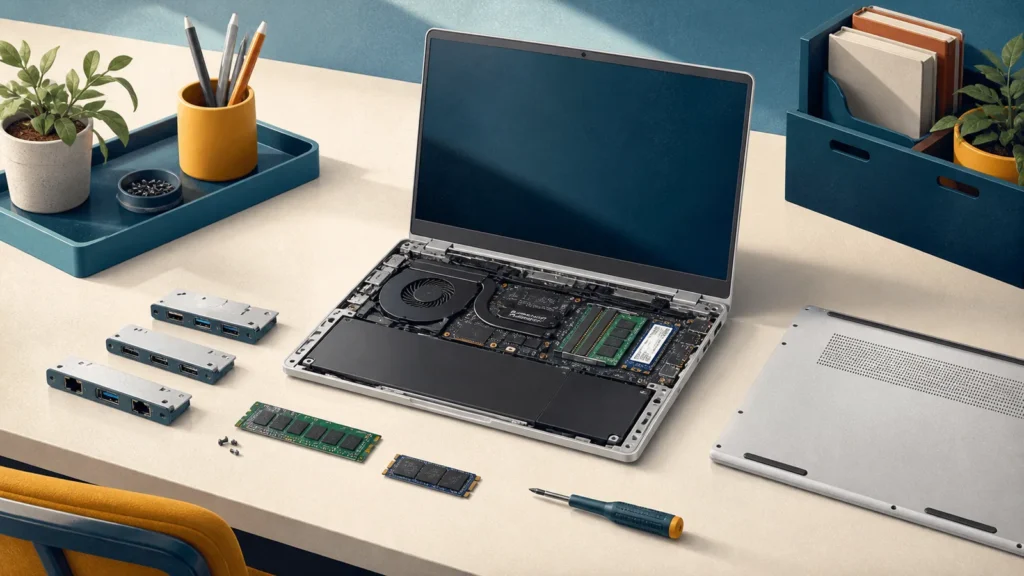
The Ryzen AI 300 generation supports processors up to the Ryzen AI 9 HX 370, DDR5 memory up to 96GB, standard M.2 storage, and four user-selectable Expansion Card positions. Framework also sells replacement parts and mainboards, making repair and future platform upgrades part of the product.
The 13.5-inch 3:2 display is suited to documents, code, and web work. Framework lists a 2.2K matte 60Hz panel and a 2.8K matte 120Hz option. The 61Wh battery, 1080p webcam, hardware privacy switches, and 1.5mm keyboard travel round out a productivity-focused package.
Flexibility brings more decisions
The Expansion Card system lets the owner choose USB-C, USB-A, HDMI, DisplayPort, Ethernet, card readers, or storage modules. The tradeoff is that cards add cost, and four positions still require prioritization.
DIY Edition buyers must select compatible memory, storage, operating system, and charger. That flexibility can save money or improve the configuration, but it creates more setup work. Prebuilt models are simpler. Linux support is documented, yet distro and kernel requirements still need checking.
Key specifications to compare
| Display | 13.5-inch 3:2; 2.2K 60Hz or 2.8K 120Hz matte options |
|---|---|
| Processor family | AMD Ryzen AI 300; up to Ryzen AI 9 HX 370 |
| Memory | Replaceable DDR5, up to 96GB |
| Storage | Standard replaceable M.2 SSD |
| Expansion | Four user-selectable Expansion Card positions |
Who should buy it—and who should skip it
Buy it if
- You intend to repair, upgrade, or reconfigure the computer instead of replacing the whole machine.
- Replaceable memory, storage, ports, battery, keyboard, display, and mainboard are meaningful benefits to you.
- You are comfortable pricing and selecting every part of a complete configuration.
Skip it if
- You want the lowest promotional price or a completely hands-off purchase.
- Four Expansion Card positions are insufficient for your always-connected desk setup without a dock.
- You prefer a retailer with widespread same-day service locations and do not value modularity.
How this research-based review was evaluated
We compared the manufacturer’s published processor, memory, storage, display, port, battery-test, and service information with the practical needs of common buyers. Because this is not a hands-on laboratory test, we do not assign a performance score, repeat unverified retailer claims, or present manufacturer battery estimates as guaranteed daily results. The recommendation is based on documented capabilities, upgrade limits, compatibility risks, and the total ownership decisions a buyer must make.
Ownership considerations
Compare complete systems. A DIY Edition price may exclude memory, storage, operating system, charger, bezel, keyboard, and Expansion Cards. Keep the included tools and follow Framework documentation during service. The upgradeable mainboard model can extend the chassis life, but future boards and parts still have their own costs; repairability improves choices rather than making ownership free.
Alternatives worth comparing
MacBook Air offers a quieter, more integrated macOS experience but no internal upgrades. ThinkPad X1 Carbon emphasizes enterprise support and travel. A mainstream Ryzen or Core Ultra laptop may cost less initially, although it generally provides fewer documented replacement paths.
Still deciding? Start with our Best Laptops guide, narrow the field with the Laptop Finder, and place finalists side by side in Compare Laptops. Our guide to how much RAM you need can help you choose a configuration without paying for capacity your work will not use.
First-week verification checklist
Use the return period to confirm the parts no specification sheet can settle for you:
- Install every essential application, plug-in, VPN, security tool, printer, and peripheral.
- Check keyboard comfort, trackpad accuracy, webcam quality, speaker clarity, and fan behavior during your real work.
- Test sleep and wake, Wi-Fi stability, external displays, charging, docks, and every port you expect to use.
- Work at your normal brightness for several days and record realistic battery life rather than relying on a maximum-hour claim.
- Inspect the display in your normal room for glare, text comfort, scaling, touch behavior, and any distracting panel characteristics.
What should you actually do?
Buy Framework when you plan to keep, repair, or reconfigure the laptop rather than replace it at the first failure. Price the complete setup—including RAM, SSD, charger, bezel, keyboard, and Expansion Cards—before comparing it with a conventional laptop. Choose prebuilt if you want the ownership benefits without assembly.
Frequently asked questions
Can the processor be upgraded?
The processor is on the mainboard, but Framework sells replacement mainboards that can upgrade the platform.
Is memory upgradeable?
Yes. This generation uses replaceable DDR5 modules.
Source: Framework Laptop 13 specifications.
Research-based editorial review. Specifications checked against Framework’s official Laptop 13 product documentation on August 29, 2026. No hands-on testing is claimed.